See the heartbeat of your network.
PingGrapher charts round-trip latency to any host in real time — with live latency zones, packet-loss and jitter tracking, and a menu-bar pulse that's always one glance away.
Requires macOS 14 Sonoma or later · Universal — Apple silicon & Intel
 PingGrapher — 8.8.8.8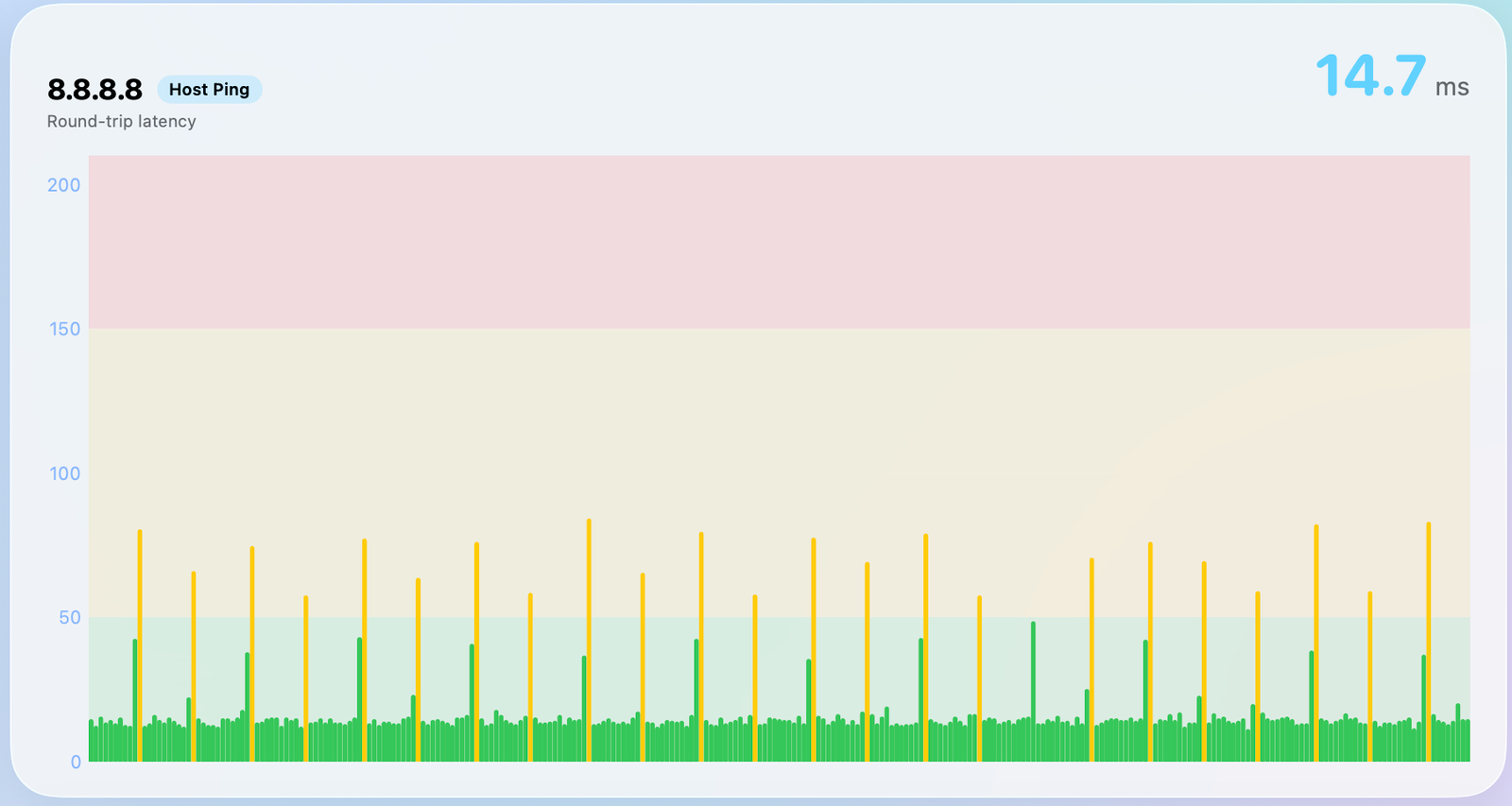
Everything in one window
A focused tool for one job, done right.
No dashboards to configure, no agents to install. Point it at a host and watch the latency unfold.
Real-time latency graph
Every reply plotted the instant it lands — smooth, continuous charting down to sub-millisecond resolution.
Latency zones
Color-banded thresholds — healthy, elevated, critical — make trouble obvious before anyone files a ticket.
Menu-bar pulse
Live round-trip time right in your menu bar. Click for a sparkline and recent history without opening the app.
Packet loss & jitter
Track drops and variance alongside latency — spot the instability a single ping number always hides.
Multi-host monitoring
Watch your gateway, DNS, and remote servers side by side. Add as many hosts as you need to keep an eye on.
Private by design
Every ping runs locally on your Mac. No account, no telemetry — nothing about your network ever leaves the machine.
Real-time graphing
Latency, drawn the moment it happens.
PingGrapher streams every ICMP reply onto a live, scrolling chart. Steady green bars are your baseline; the orange spikes are the outliers you actually care about — instantly visible, never buried in an average.
- ✓Continuous high-frequency sampling with a smooth scrolling timeline
- ✓The big current reading stays pinned, so the latest RTT is always front and center
- ✓Hover any point for the exact timestamp, RTT, and sequence number
Latency zones
Good, elevated, critical — at a glance.
Set your own thresholds. PingGrapher paints the background in living color so the state of a connection reads from across the room.
Always on
Your network's pulse, in the menu bar.
PingGrapher lives quietly in your menu bar with the current round-trip time always showing. Click it for a sparkline of the last few minutes and jump to the full window only when something looks off.
- ✓Live RTT in the menu bar, tinted by zone
- ✓A Liquid Glass dropdown with recent history at a glance
- ✓Optional alerts when a host goes dark or latency spikes
 14.7 ms9:41
FAQ
Questions, answered.
What exactly does PingGrapher do?
What are the system requirements?
Can I monitor more than one host?
Is my network data private?
Can I customize the latency thresholds?
Does it keep history?
Ready to feel your network's pulse?
Download PingGrapher and put a live heartbeat monitor for your connection right in your menu bar.
Version 1.1 · 1.4 MB · Universal — Apple silicon & Intel · Requires macOS 14 Sonoma or later
SHA-256 51200b37f755c420a5dc4fa22146dc4e0d0cc6c341e6b4d24f315e2ecc10acd0
Release notes
What's new.
1.1 — 19 August 2026
Dropped packets now line up correctly. A lost ping was timestamped when its timeout expired rather than when the probe was sent, which placed its red bar a second late — on top of the next successful reply instead of in the gap where the loss happened. Samples are now stamped at send time.
History keeps itself tidy. Old samples were only cleared at launch, so an app left running in the menu bar for weeks never pruned, and the database file never shrank even after deleting rows. Pruning now runs on a timer and reclaims the space.
Saved state survives. A target left switched off for over a week lost the snapshot that lets it redraw instantly when re-enabled. Those snapshots are no longer aged out.
Traceroute accuracy. A run cut short by a network error was treated as a finished path, discarding real hops and recording an intermediate router's response time as the destination's. It is now recorded as a single lost measurement.
Smaller fixes. Switching between targets no longer carries the previous one's scroll position across; live values keep updating while the window is being resized; clicking the already-selected target in the sidebar returns to its detail view.
1.0 — 16 August 2026
First public release.
New — Service Check targets. Plenty of hosts firewall ICMP, so a ping says they're down when the service behind them is fine. A Service Check measures what actually matters: a TCP handshake to host:port, or an HTTP(S) request timed to response headers. It reuses the same charting, history, and alerting as every other target type.
New — Overview dashboard. Every active target on one screen, sized to its type, with a sweep heatmap for range scans.
New — Jitter and connection quality. Mean inter-packet delay variation plus an ITU-T G.107 E-model MOS estimate, shown alongside the latency stats.
Rebuilt probing engine. PingGrapher no longer shells out to ping and traceroute. All probing now happens in-process over unprivileged ICMP sockets, which means no helper processes, no output parsing, and true per-packet timing. The app is also fully sandboxed.
Upgrading from an earlier build: your targets and preferences carry over automatically. Historical latency graphs do not — sandboxing moves the app's storage into a container, and previously recorded history stays outside it. New history starts recording immediately.
Note for anyone who downloaded 1.0 on launch day: the app's identifier changed to com.sixdoes.PingGrapher shortly after release. macOS keys an app's storage to that identifier, so the current build starts with an empty history and target list rather than picking up the earlier one's. Re-adding your targets is the only step; the old data can be removed with rm -rf ~/Library/Containers/net.pickering.PingGrapher.
Also on the Mac App Store. PingGrapher is available both as a direct download here and from the Mac App Store, always at the same version. Identical builds from the same source — pick whichever you prefer.
Requires macOS 14 Sonoma or later. Universal — native on Apple silicon and Intel.